จาก
พฤหัสบดีที่ , 25/1/2550
เวลา : 11:10
อ่าน = 349
125.24.239.149
|
http://www.microsoft.com/downloads/details.aspx?FamilyId=B038D4B5-1D88-437C-9F54-1FB0D210B5EF&displaylang=en
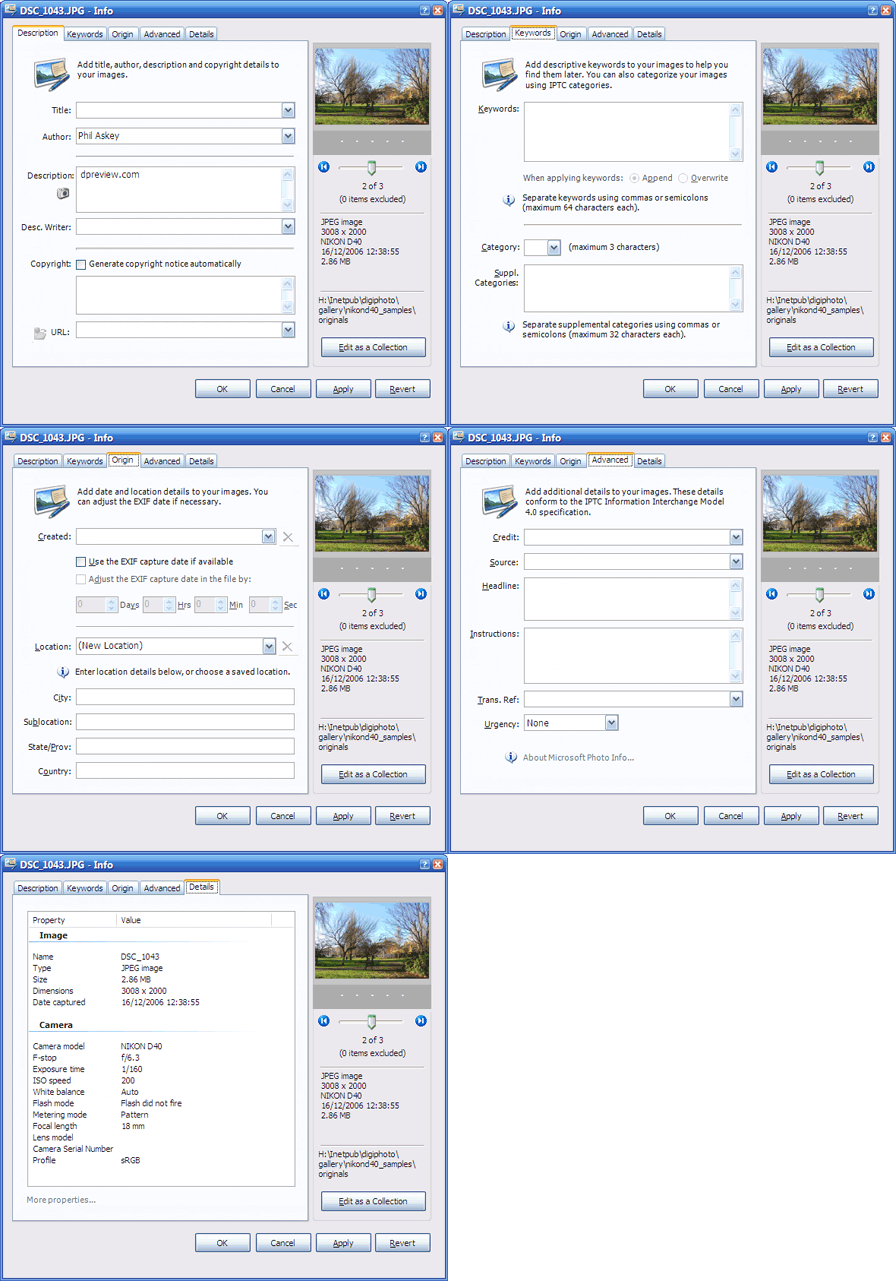
Microsoft Photo Info is a new software add-in for Microsoft Windows that allows photographers to add, change and delete common "metadata" properties for digital photographs from inside Windows Explorer. It also provides enhanced "hover tips" and additional sort properties for digital photographs in Explorer (in Details view).
Features
View or edit photo metadata from inside Windows Explorer. Now, advanced image properties are at your fingertips from within Windows.
Edit images individually, or as a collection. Photo Info has two edit modes: individual and collection, making it easy to update many images at the same time.
Quick recall of recent entries. For some properties, Photo Info remembers the most recent entries you have typed. To recall a recent entry, click on the drop down arrow and select it from the list.
Generate copyright notice automatically. Photo Info can generate a standard copyright notice automatically from the Author and date Created information, if present.
Quick recall of location details. To help save time when entering location information, Photo Info can save location details under a name you provide. Recall these details by selecting the location name from the drop-down menu.
Correct EXIF capture date / time information. Photo Info can optionally update the EXIF date/time information as recorded in the image file by your camera. You can use this feature to correct the file capture date if your camera's clock was set incorrectly (for example, to the wrong time zone).
View EXIF properties. Click on the Details tab to view common EXIF properties. Click on More properties for additional details.
Preview the image. To see a larger preview of the image, double-click on the thumbnail.
Enhanced hover tips. Hover tips have been enhanced for JPEG, TIFF and other supported file types in Windows Explorer.
Custom column properties. In Windows Explorer when viewing a folder in Details view, additional sort properties are available for supported image types.
Supported file types
The initial release of Microsoft Photo Info supports the following common image file types: JPEG, TIFF, WDP, HDP (HD Photo), NEF, CR2, and CRW*. Support for additional file formats is under consideration for a future release.
* Support for CRW files requires that an associated THM file is present in the same folder as the selected CRW image. (THM files are thumbnail "sidecar" files generated by certain Canon cameras.)
|